Kargo
Kargo is a global advertising tech company that focuses on helping advertisers go beyond the first impression to captivate consumer attention. Kargo helps leading brands drive meaningful customer connections across mobile, social platforms, CTV (Connected TV) and the open web.
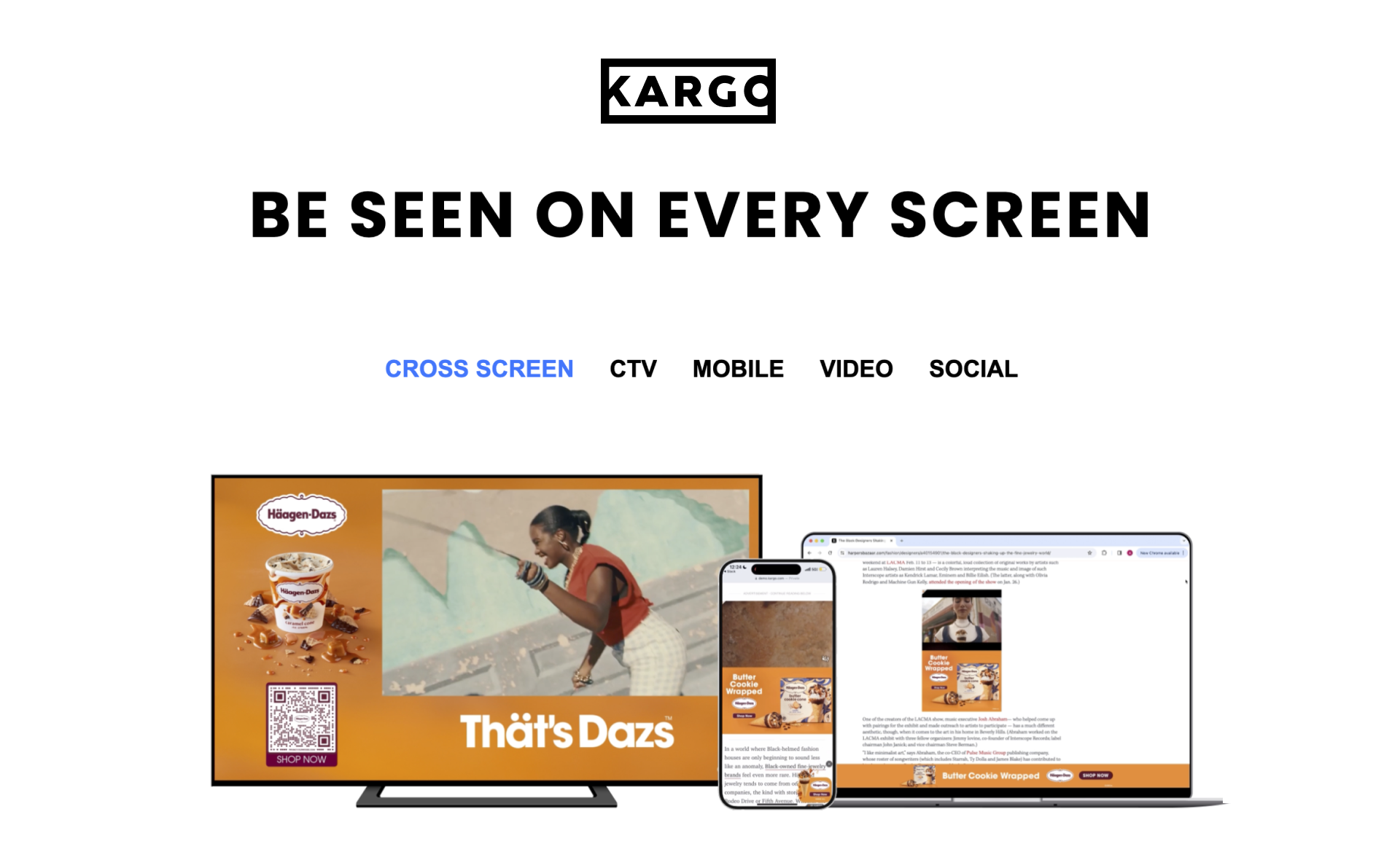
I led design on the Creative Tech and Creative Solutions teams.
My work focused on designing creative tools and products used by internal teams and external clients to create ad designs for ad campaigns across social media platforms, the open web, and CTV (Connected TV).
Tools I've worked on are used to create over 10,000 unique ad designs monthly.
Selected projects from my time at Kargo.
Automating Ad Design Updates for Ad Campaigns
ABOUT THE PROJECT
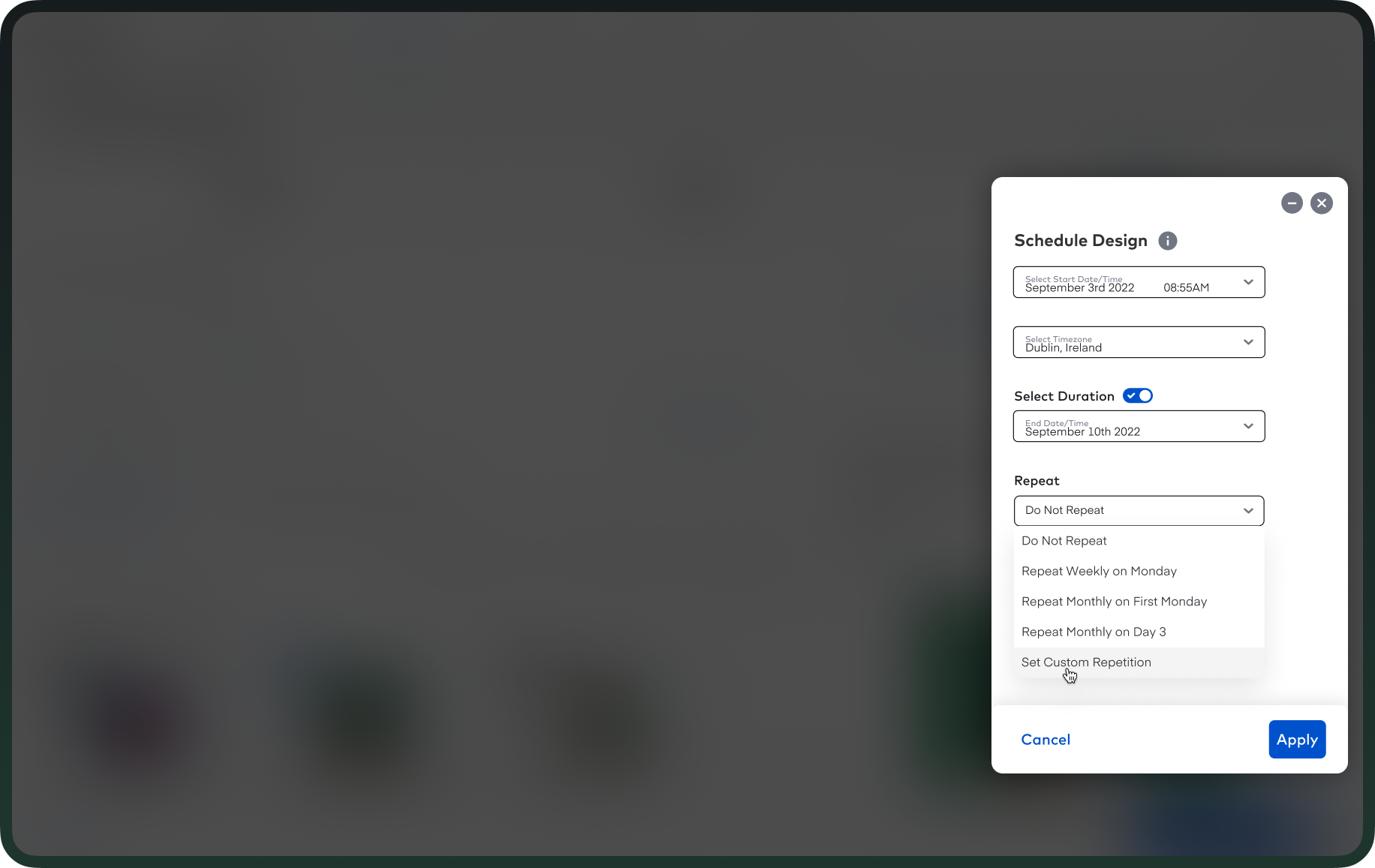
A new scheduling feature in Kargo Commerce's ad creative tool that lets users schedule when ad designs go live or change on social media campaigns, replacing a manual process where someone had to be at their computer at exact moments (often midnight, weekends, or holidays) to switch designs on and off.
PROBLEM
Kargo Commerce's users, internal customer success managers and external clients from major retail brands like Steve Madden, Walmart, Albertsons and so on, manage ad campaigns on social media platforms like Facebook and Pinterest. Many of those campaigns required ad designs (like a "Black Friday Sale" graphic) to go live at very specific times and come down again when the promotion ended.
The only way to do this was manually. If a client was running a Black Friday flash sale that needed to start at midnight on Friday and end Sunday night, someone had to log in at midnight to activate the design, then log back in Sunday night to switch it off. The same applied to holiday promotions, time-zone-specific launches for international campaigns, and any time-sensitive event happening outside business hours. This resulted in users working odd hours and occasionally missing activations.
MY ROLE
Lead designer. I ran user research and brainstorming sessions alongside the product manager, designed the full feature end-to-end, conducted usability testing with users, and partnered with engineering through implementation.
SOLUTION
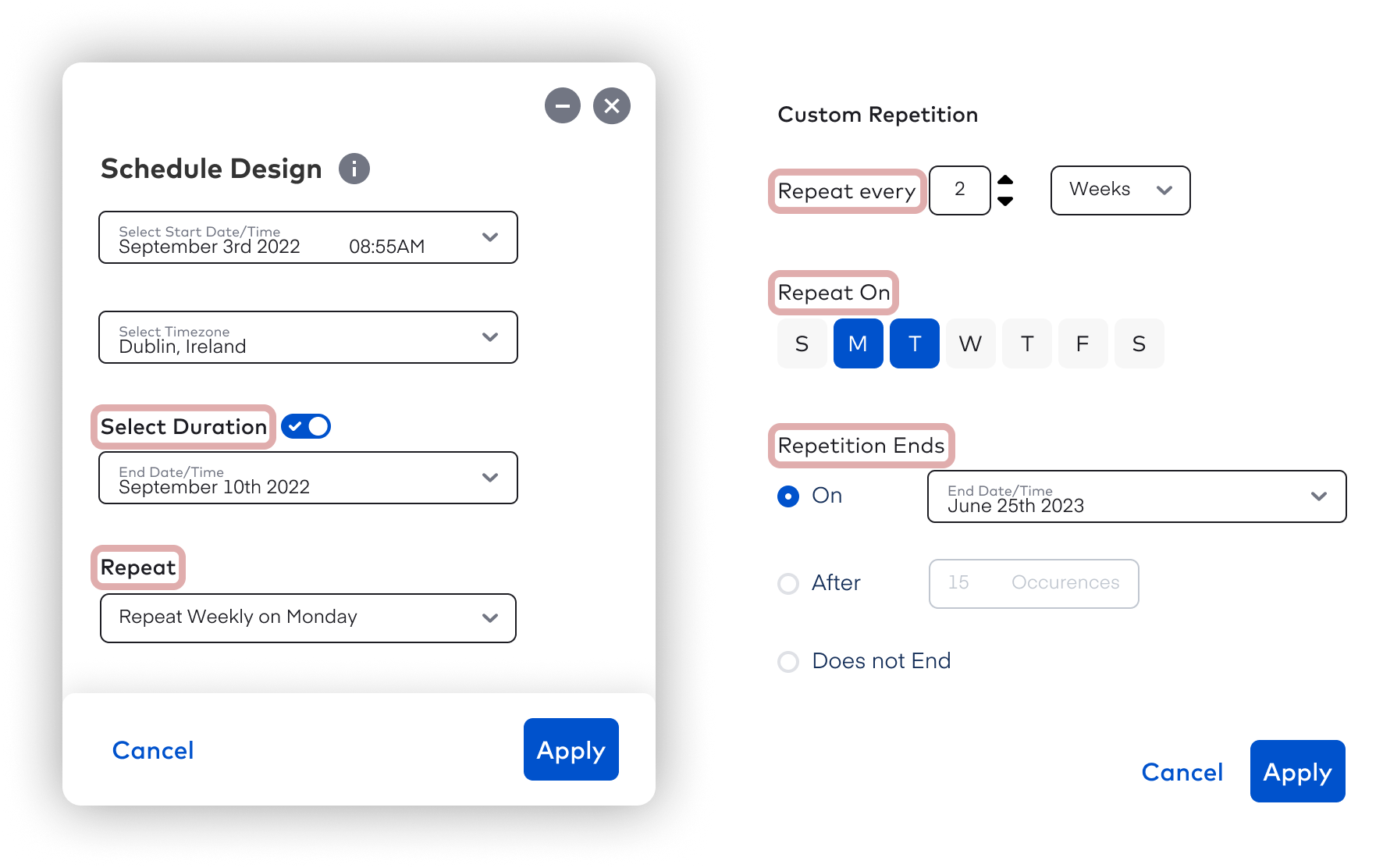
I designed a scheduling flow where users can set when a design goes live, which time zone the schedule follows, and how long it stays active. I designed advanced controls like custom recurrence (daily, weekly, monthly), specific repeat days, and end conditions (end on a date, or after a number of occurrences) to sit behind a toggle, using progressive disclosure to keep the default experience simple while still supporting power users with complex needs.
The flow also handles edge cases gracefully: if a user sets up a recurrence that conflicts with the event duration or exceeds system limits, clear error messages guide them to fix it before saving.
IMPACT
The feature was one of Kargo Commerce's most well-received releases, with users specifically praising its impact on their work-life balance. They no longer had to log in at midnight or on weekends to manually activate or deactivate campaigns. It made time-sensitive campaigns (flash sales, holiday promotions) reliable and made international campaigns easier to coordinate across time zones.
Redesigning Kargo's Creative Workspace
ABOUT THE PROJECT
A redesign of Creative Hub, Kargo's central workspace for storing, browsing, and managing ad creatives and assets. The redesign focused on clarifying content structure and tightening the experience for both internal and external creative teams.
PROBLEM
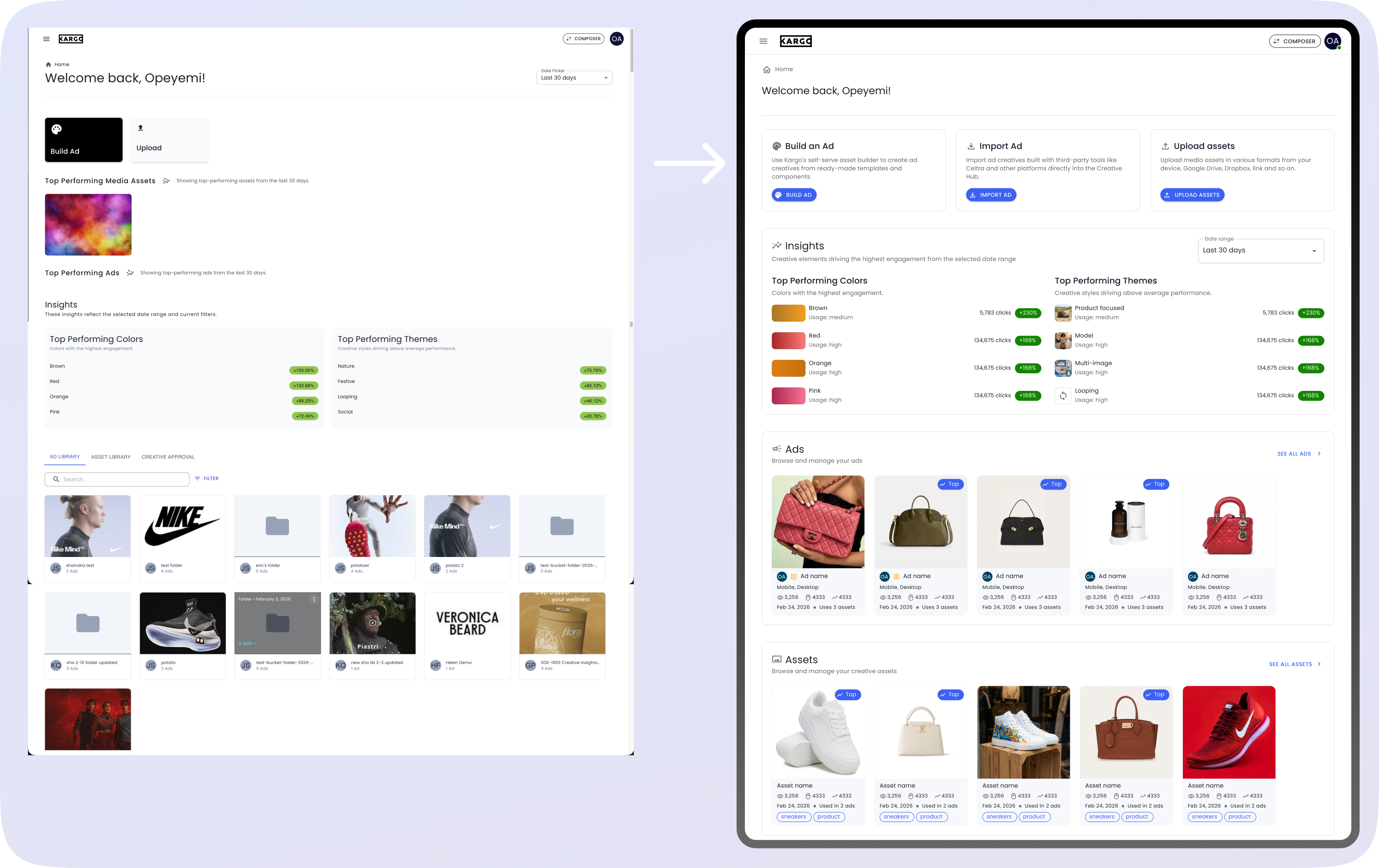
Creative Hub had been built quickly before designers were involved, and the product shipped to production as an MVP with significant UX gaps. The landing page felt crowded, the hierarchy was unclear, and users struggled to tell different types of content apart (folders vs. albums vs. ads vs. individual assets). Important actions weren't clearly surfaced, key information was hidden behind hover states, and the detail pages were missing previews entirely, making it hard for users to understand what they were even working with.
With the next major release four weeks away, the team needed a redesign fast: two weeks for design, two weeks for development.
MY ROLE
Lead designer. I owned the redesign end-to-end, running the initial UX review of the MVP, defining scope with product, designing all key screens through multiple iterations, running A/B preference testing to validate the redesign, and partnering with engineering through implementation.
SOLUTION
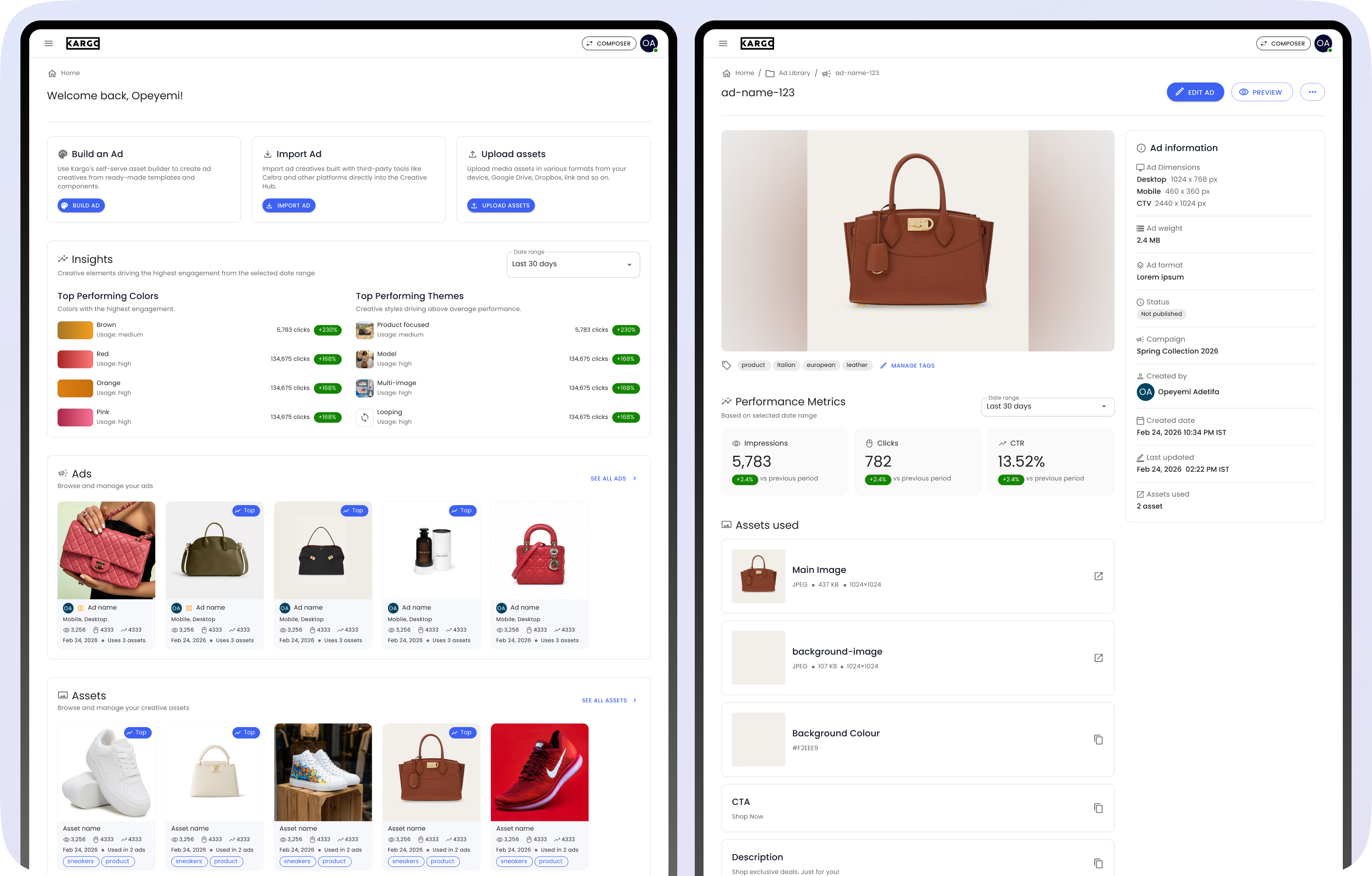
A redesign of the core screens (landing page, Ad Library, Asset Library, and the ad and asset detail pages) focused on simplifying structure rather than adding features. Folders, albums, ads, and individual assets each got distinct visual treatment so users could tell them apart at a glance. Important metadata moved out from behind hover states and directly onto the cards themselves.
The detail pages got prominent previews at the top so users could immediately see what they were working with, alongside dedicated information panels for metadata and a clearer view of where each asset was being used elsewhere in the system.
One key simplification: instead of a dedicated "Top Performing" section that was limited to the landing and main library pages, performance was communicated through badges applied directly to the performing items. This made top performance visible everywhere users were working, while cutting page length and duplication on the landing and main library pages.
IMPACT
A user-preference A/B study with 30 participants showed 28 (93%) preferred the redesign, citing clearer structure, easier navigation, and better content understanding. After launch, Creative Hub-related support tickets dropped 62% in the first two months, a strong signal that users were completing tasks more independently and getting confused or stuck less often.
A Brand Asset Library for Kargo's Creative Studio
ABOUT THE PROJECT
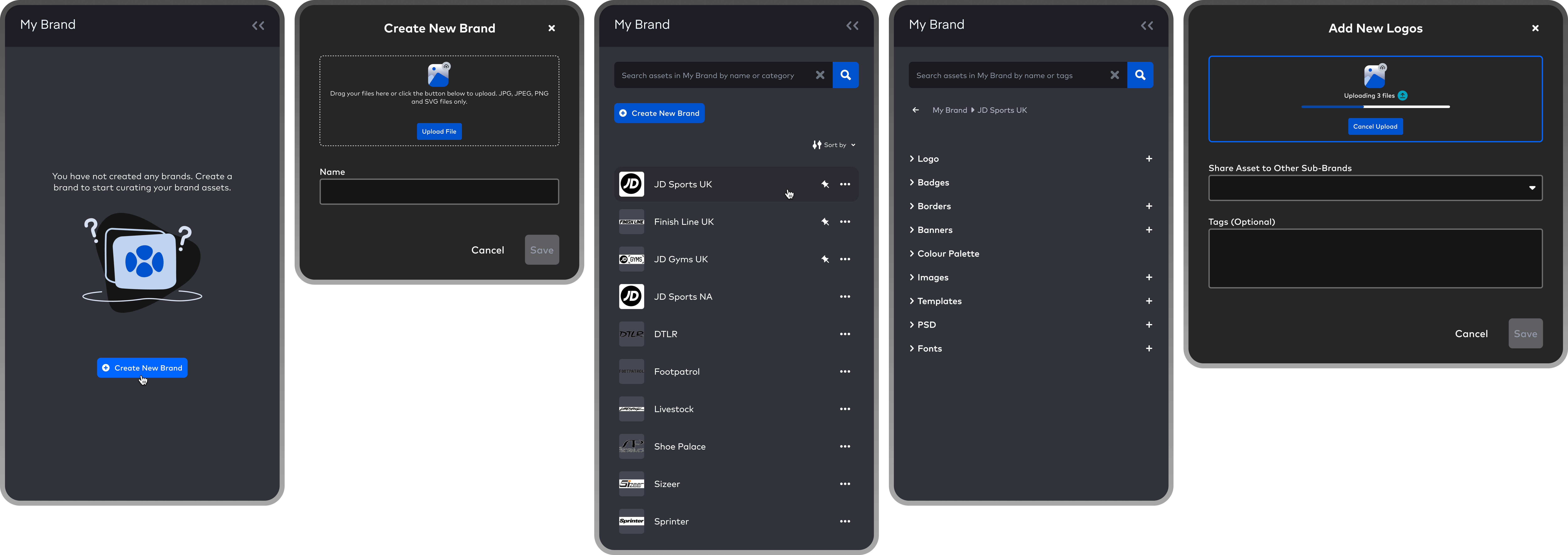
A new feature in Kargo's Creative Studio (the tool users use to design ad creatives) that lets users create brands and, within each brand, upload reusable assets organised into clear categories like logos, badges, banners, images, templates, fonts, and more.
The feature serves both Kargo's internal customer success managers (who manage creative work across many client brands) and external users from companies that manage multiple brands, where each brand needs its own distinct asset library.
PROBLEM
Before this feature, Creative Studio had a section called "My Files" where users uploaded assets they wanted to reuse, but it was effectively a single flat folder with no management capabilities. Users couldn't create subfolders, couldn't categorise, couldn't sort, couldn't rename. Over time, this turned into a dumping ground.
When a user wanted to reuse a logo or banner from a past project, they often couldn't find it. They'd scroll endlessly through hundreds of uploaded files, give up, trawl through folders on their local machine to find the original, and re-upload it wasting time on something that should have taken seconds.
MY ROLE
Lead designer. I owned the design end-to-end, ran ideation sessions with users and stakeholders from product and engineering to generate ideas and align on user needs, designed all high-fidelity screens in the flow, and supported engineering through implementation.
SOLUTION
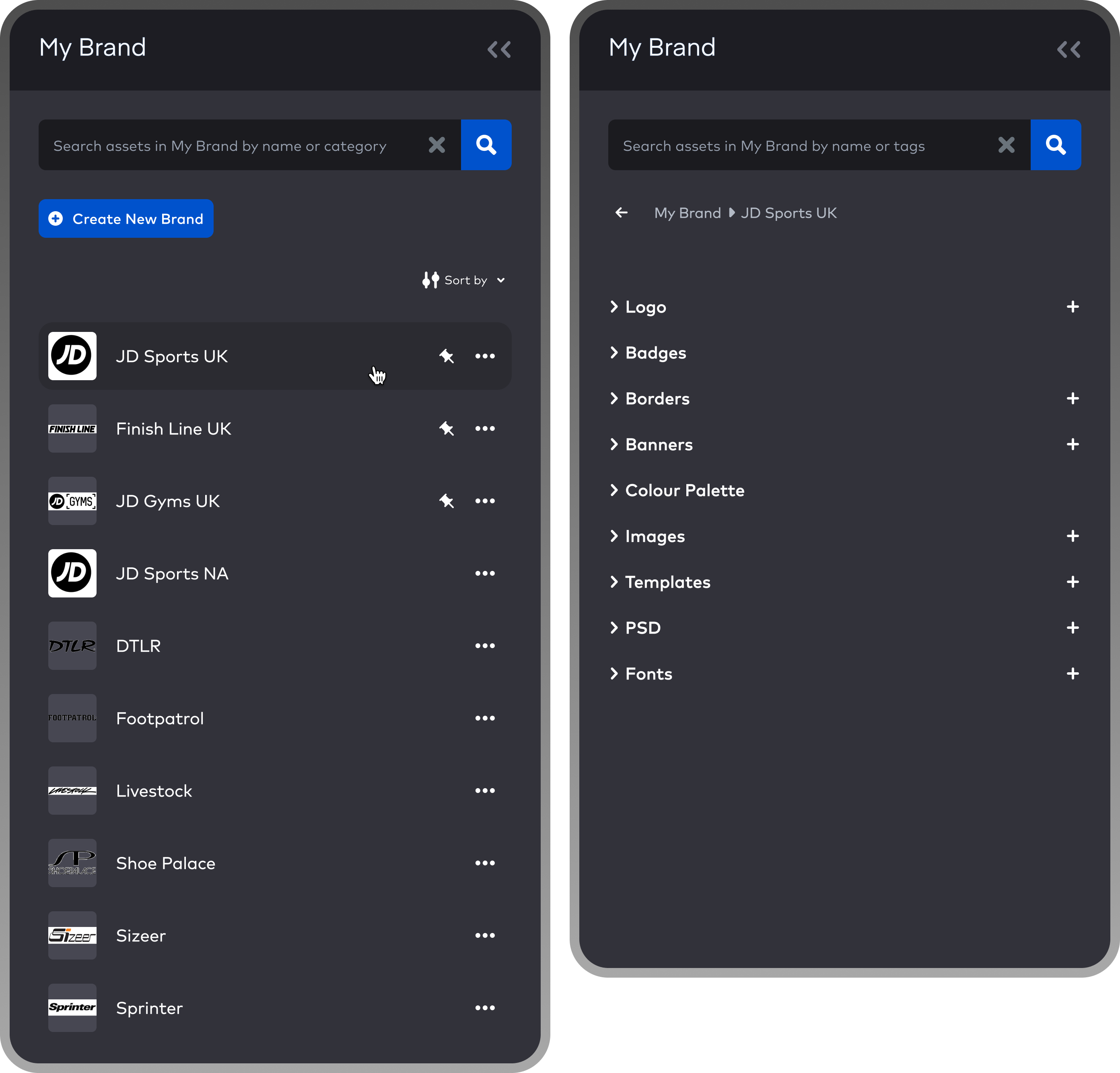
A flow that lets users create brands (multiple, if they manage more than one) and, inside each brand, upload assets organised into clear categories: logos, badges, banners, images, templates, fonts, and others. For users working across multiple brands, this separates assets cleanly so a logo or banner from one brand never gets mixed up with another's.
Frequently-used brands can be pinned to the top of the list, giving users quick access to the brands they work with most often without having to search or scroll through their full library.
IMPACT
Users reported that the feature saved them hours of time each week. It replaced a workflow where they either scrolled through hundreds of uncategorised files inside Creative Studio or searched their own local machines for assets they'd already uploaded, with one where reusable assets sit in clear, categorised brand libraries that make finding and reusing them straightforward.
AI Image Generation in Kargo's Creative Studio
ABOUT THE PROJECT
A new feature added to the asset panel in Creative Studio (the tool users use to design ad creatives) that lets users generate images using AI through natural language prompts, directly inside the tool they were already working in.
PROBLEM
Creative Studio's asset panel already let users search for stock images from third-party platforms like Pixabay without leaving the tool. But after AI image generation became widely available, user focus groups surfaced a new pattern: users were leaving Creative Studio to generate images in third-party AI tools, then bringing them back in. Every round of "I need a different image" meant another context switch out of the tool.
MY ROLE
Lead designer. I owned the design end-to-end, conducted user focus groups in collaboration with the product manager, designed all high-fidelity screens in the flow, and supported engineering through implementation.
SOLUTION
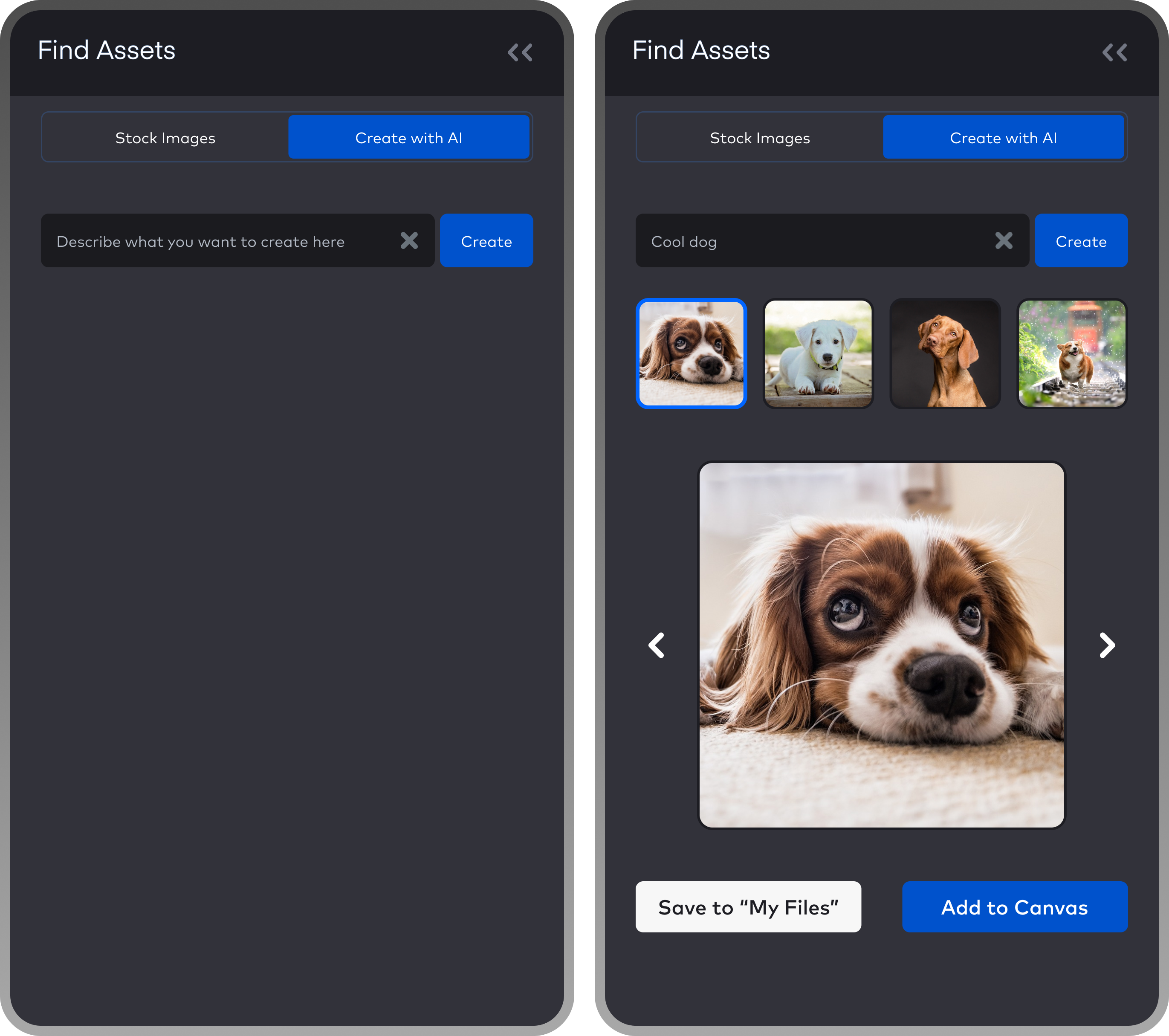
A new "Create with AI" tab inside the existing asset panel, sitting alongside the stock image search. Users describe what they want in natural language, and the system generates a set of options to choose from. Once a user picks one, they can either drop it directly onto the canvas they're designing on, or save it to their brand asset library.
IMPACT
The feature closed the workflow gap that had been pulling users out to third-party AI tools. After launch, users reported that having image generation available alongside stock search streamlined their creative process and removed an unnecessary context switch. It also gave a meaningful share of users their first hands-on experience with AI image generation, since many had never used those tools outside of work.
A Better Way to QA Thousands of Ad Variants
ABOUT THE PROJECT
An expansion of the preview tool inside Kargo's Creative Studio, the tool users use to design ad creatives. The expansion gave users far more control over which products in their catalogue they could preview, helping them catch design issues before running ad campaigns.
PROBLEM
Creative Studio is a dynamic ad creation tool. Instead of designing one ad per product, users design one template once, connect it to their product catalogue, and the tool automatically generates a unique ad for every product in that catalogue. For clients like major retailers with hundreds of thousands of products, this saves enormous amounts of design time. Genuinely transformative for any team running large-scale ad campaigns.
But generating thousands of ad variants automatically creates a quality assurance problem. Every product in a catalogue is slightly different. Some have very long names, some have unusual price formats, etc. and a design that looks great with one product can break in unexpected ways with another.
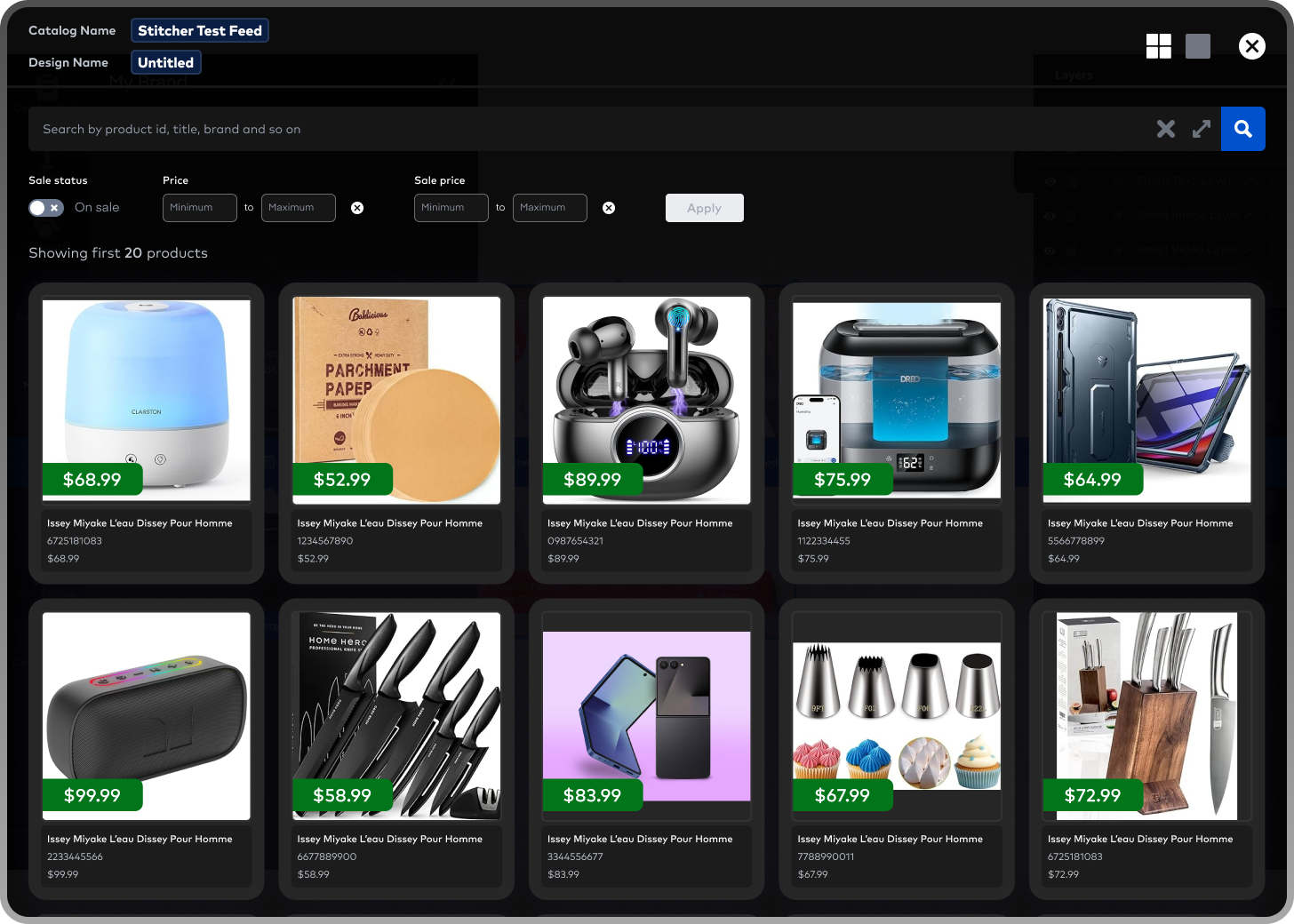
The existing preview tool only showed the first 50 products in the catalogue. For clients with thousands of products, that first 50 was nowhere near enough to surface the full range of design issues hiding deeper in the catalogue. Users were either approving designs blind or spending hours trying to manually check products outside the preview's reach.
MY ROLE
Lead designer. Owned the design end-to-end, defined UX strategy with the product manager, designed all high-fidelity screens in the flow, and supported engineering through implementation.
SOLUTION
A significantly expanded preview tool that lets users actively search and filter through their entire product catalogue, not just the first 50.
Users can now search for specific products by ID, title, brand, and other product attributes. They can also paste multiple product IDs at once as a comma-separated list, and the tool filters the catalogue down to just those products. Beyond search, users can filter by sale status, regular price, and sale price, letting them quickly preview the kinds of products most likely to expose design problems (longest names, highest prices, items on sale, etc.).
Together, these gave users the tools to actually validate their designs against the full range of product variation in their catalogue, instead of crossing their fingers and hoping the first 50 products were representative.
IMPACT
Support tickets related to badly-generated ad designs dropped 72% after launch (measured through Zendesk). From user testimonials, the update also reduced what they called their "QA anxiety", giving them the tools to inspect generated designs to their satisfaction before launching campaigns, instead of approving them on partial information.