VikingCloud
VikingCloud is a global cybersecurity and compliance provider that helps businesses protect their systems, data, and payment environments from cyber threats. It offers a cloud-based platform combining AI-driven insights, risk assessment, and managed security services to keep organizations secure and audit-ready.
I was one of the senior designers on the VikingCloud Platform (VCP) team. My work focused on designing cybersecurity and compliance solutions for large organisations with extensive security needs, as well as simple, all-in-one solutions for small and medium enterprises. The tools I've worked on are used by over 4 million businesses across 70+ countries.
Selected projects from my time at VikingCloud.
A Scam Prevention Tool for Small and Medium Businesses
ABOUT THE PROJECT
A new scam prevention feature in VikingCloud's cybersecurity platform that lets small and medium business users scan suspicious content (emails, texts, website links, images, and videos) and get a clear risk rating before deciding what to do with it.
PROBLEM
Small and medium businesses face increasingly sophisticated scams. Phishing emails pretending to be from suppliers, fake invoices, suspicious links from unknown contacts, AI-generated fake videos, and so on. These can result in financial loss, data breaches, or compromised systems. Most businesses at this size don't have access to tools sophisticated enough to verify suspicious content before acting on it.
MY ROLE
Lead designer on the project. I refined UX strategy in close collaboration with product, designed all high-fidelity screens in the product, and supported engineering through implementation.
SOLUTION
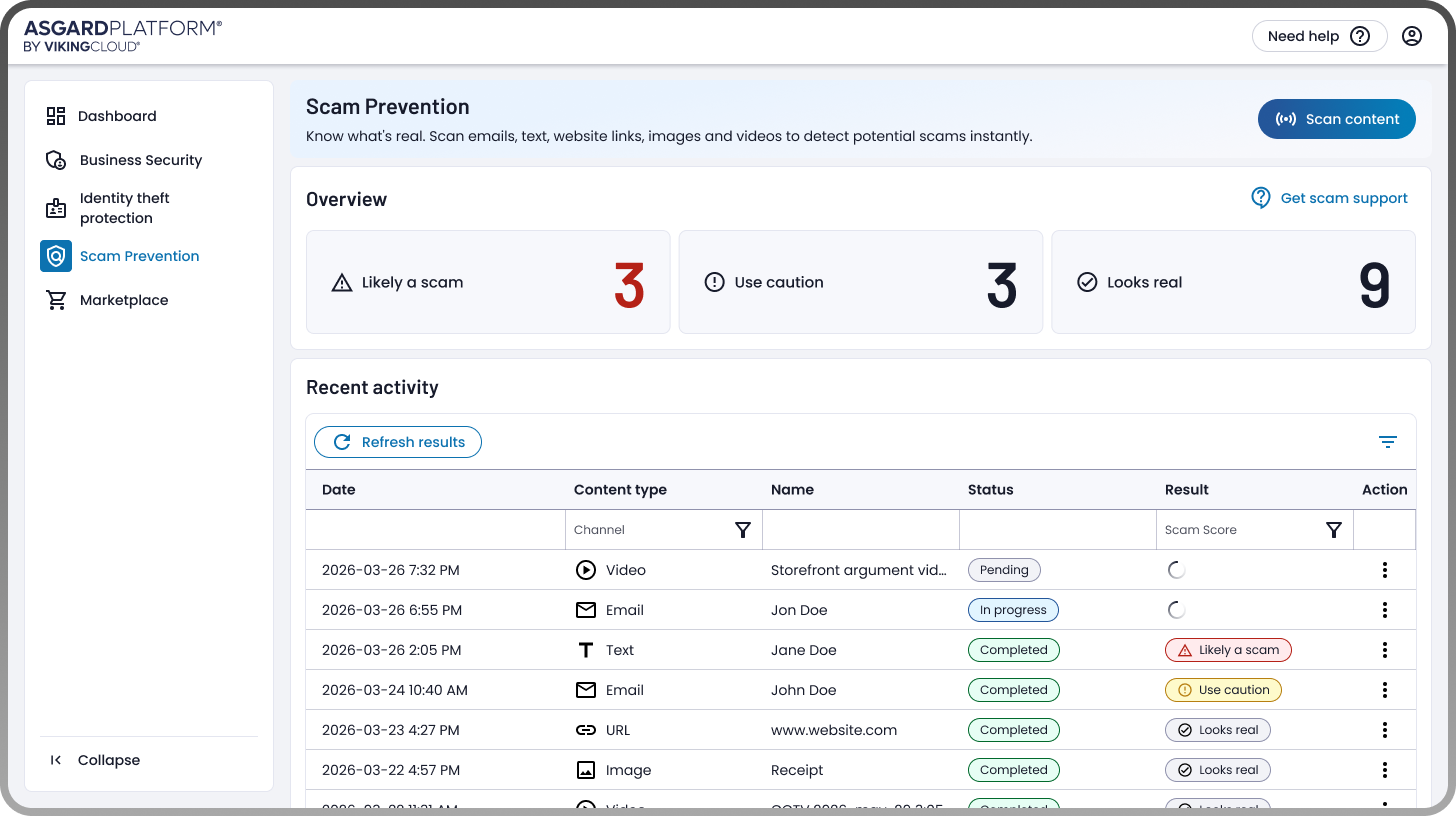
I designed a dedicated “Scam Prevention” tool in VikingCloud's platform with two main flows. For submitting content, users choose what type of content they want to check (email, text, website link, image, or video), upload or paste it in, and hit "Scan it." They get an immediate confirmation that the scan is in progress, with the result coming back to their dashboard.
For reviewing results, a dashboard shows three counters covering the three risk categories: "Likely a scam," "Use caution," and "Looks real." Below that, a recent activity table lists every scan a user has run, with filters to narrow by content type or risk level, and the ability to drill into any individual result for detail. If a user thinks a scan got it wrong, they can flag it as "This doesn't look right" to dispute the result and improve the underlying detection over time.
IMPACT
The feature is designed to give small and medium business users a fast, confident way to verify suspicious content before acting on it. The experience aims to reduce the kinds of scam-driven losses that are hardest for smaller businesses to absorb, like bad payments to fake suppliers, credential theft from phishing, and compromised systems from malicious links or files.
Dashboard Customization for VikingCloud's Platform
ABOUT THE PROJECT
A new dashboard customization feature in VikingCloud's cybersecurity platform that lets users choose which widgets appear on their dashboard and in what order, so the dashboard surfaces what's most relevant to their specific security needs.
PROBLEM
The platform's dashboard shows information from a growing set of cybersecurity tools and features. As new tools and features get added to the platform, more widgets get added to the dashboard alongside them. Over time, this means every user sees the same dashboard regardless of how relevant each widget actually is to their business.
But businesses have very different security needs and priorities. A retailer focused on payment security cares about different things than a small business focused on identity protection. A user logging in to check on one specific area shouldn't have to scan past widgets that don't apply to them. The default dashboard could not serve everyone equally well.
MY ROLE
I co-led design on the project with another designer in an even collaboration. We explored multiple high-fidelity directions for how customization could work, then combined our ideas into the final flow.
SOLUTION
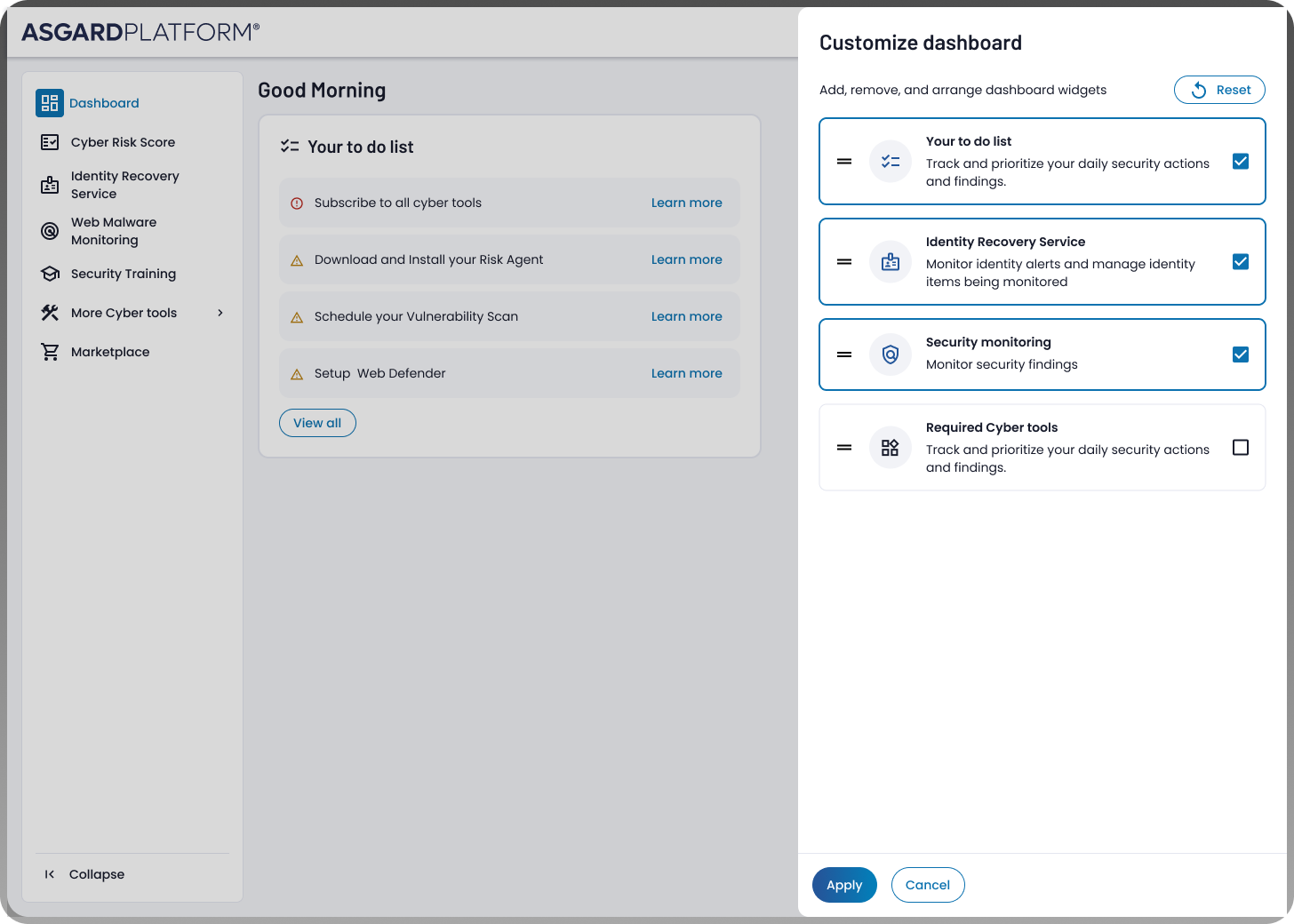
A "Customize dashboard" button on the dashboard triggers a side panel where users can choose which widgets appear, using checkboxes for each available widget. Users can also drag widgets into their preferred order, putting the things they care about most at the top. A Reset button at the top of the panel lets users return to the default state if they want to start over. Once changes are applied, the dashboard updates to reflect the user's choices, persisting between sessions.
IMPACT
Customization matters in cybersecurity tools because users come to the platform with very different priorities. A one-size-fits-all dashboard forces everyone through the same experience regardless of what they're actually responsible for. By giving users control over what they see and in what order, the feature helps each user get to the information that matters most to them faster. Over time, as the platform adds more widgets, the value of this customization compounds. Without it, the dashboard would only get more crowded and less useful per user.
A Partner Dashboard for VikingCloud's Web Security Tool
ABOUT THE PROJECT
A new partner dashboard that lets large payment platforms (companies like PayPal, Elavon, and WooCommerce) resell JSIM, VikingCloud's web security tool, to their own merchant customers, and manage all those merchant accounts from a single place.
Quick context on JSIM: e-commerce checkout pages run JavaScript code, and that code is a frequent target for attackers who try to inject malicious code that steals customers' credit card information during checkout. JSIM monitors checkout pages to detect this kind of tampering before it causes damage. A new payment-industry security standard (PCI 4.0.1) now requires merchants to monitor their checkout code for exactly this kind of attack, which is what JSIM provides.
PROBLEM
JSIM was originally built inside VikingCloud's larger security product, available to merchants directly. But large payment platforms, companies that provide checkout infrastructure to thousands of merchants, wanted to offer JSIM as part of their own service to those merchants. To make that possible at scale, partners needed a way to manage every merchant account themselves: create new ones, set usage limits, track activity, monitor billing, suspend or modify accounts as merchants changed. None of that existed yet, because JSIM had only ever been used by individual merchants directly.
MY ROLE
Lead designer on the project. I refined UX strategy in close collaboration with product, designed all high-fidelity screens for the dashboard, and supported engineering through implementation.
SOLUTION
A partner-facing dashboard within VikingCloud's platform with several connected views.
The dashboard view shows key metrics at a glance, broken down by month so partners can track growth over time: number of active merchant accounts, URLs being monitored, scans run, transactions processed, and new accounts added.
The account list view shows every merchant account a partner manages, with the merchant's business name, how many URLs they have under monitoring, account status (active or disabled), where they are in the onboarding process, and transaction volume.
Account management screens let partners add new merchant accounts and set a maximum URL limit (which acts as a license tier), edit settings as merchants upgrade or expand, and disable accounts without permanently deleting them, preserving historical data for billing and audit purposes.
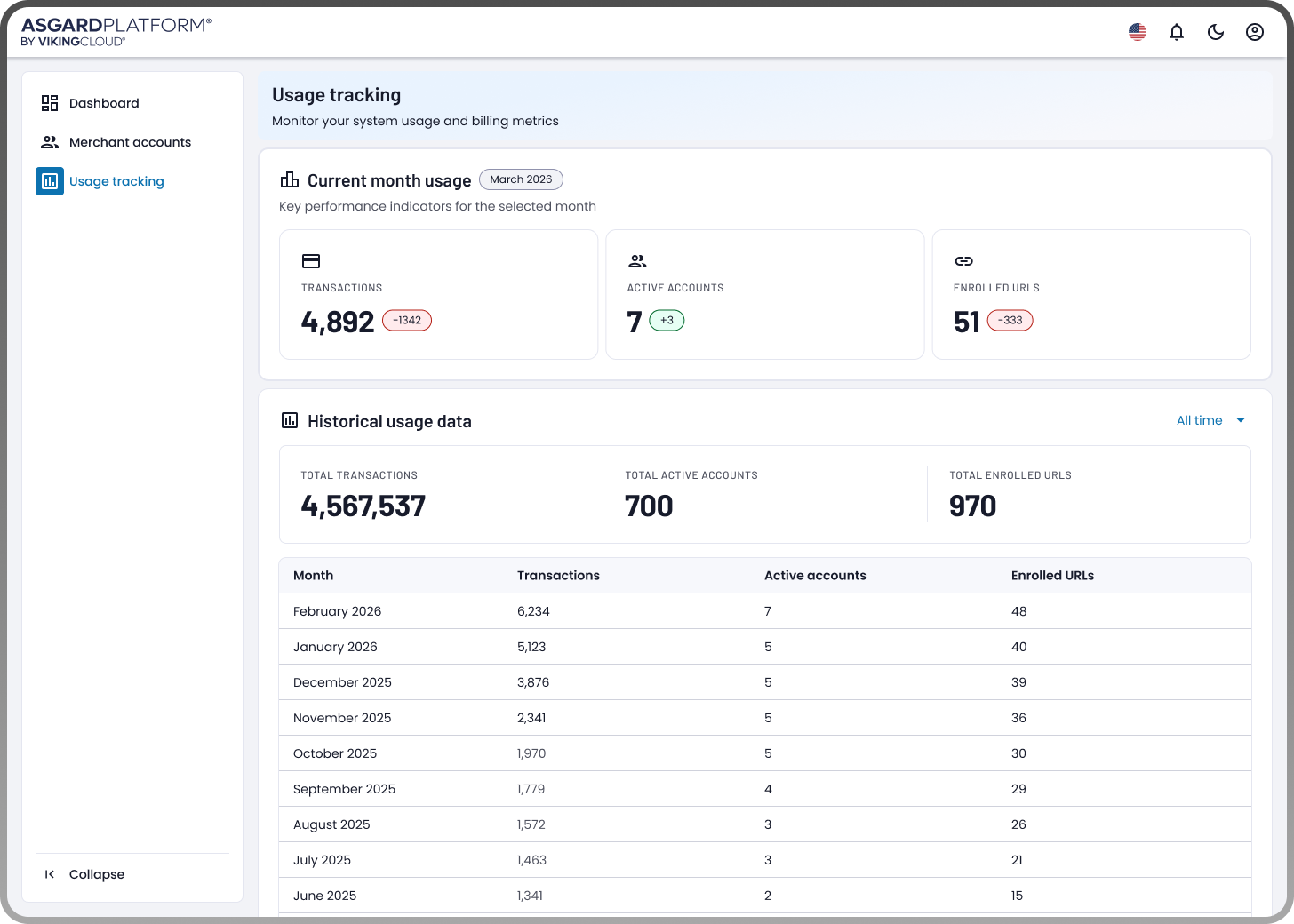
A usage tracking view shows current-month usage and historical finalized data, helping partners monitor their own system load and verify their billing tiers.
IMPACT
The dashboard is designed to make JSIM viable as a reseller product for the first time, opening it up to large payment platforms that handle thousands of merchants. By giving partners self-service control over their entire merchant base, the experience replaces what would otherwise be manual coordination with VikingCloud for every account-level change.